Overview
Alerting allows you to define granular alert rules across your entire application environment and manage notifications using powerful, flexible routing. Built to handle complex, distributed architectures, it integrates seamlessly with the FusionReactor Cloud stack to provide a scalable and proactive monitoring solution that ensures high availability across any environment.
FusionReactor's alerting system is built on Grafana's Ruler (for rule evaluation) and Alertmanager (for notification routing) - the industry-standard open-source alerting stack used across Prometheus-based environments. All core concepts described in the Grafana Alerting documentation apply directly here.
Migrating from simple alerting?
The advanced alerting system is more powerful but requires a few additional setup steps compared to the previous Mimir-based alerting. The key differences are:
- Alert rules must be placed in a folder (create one if you don't have one yet).
- Rules are assigned to an evaluation group that controls the check interval.
- Routing to contact points is driven by labels on the alert rule, matched by notification policies.
See Configure Alert Rules for a full walkthrough.
How it works
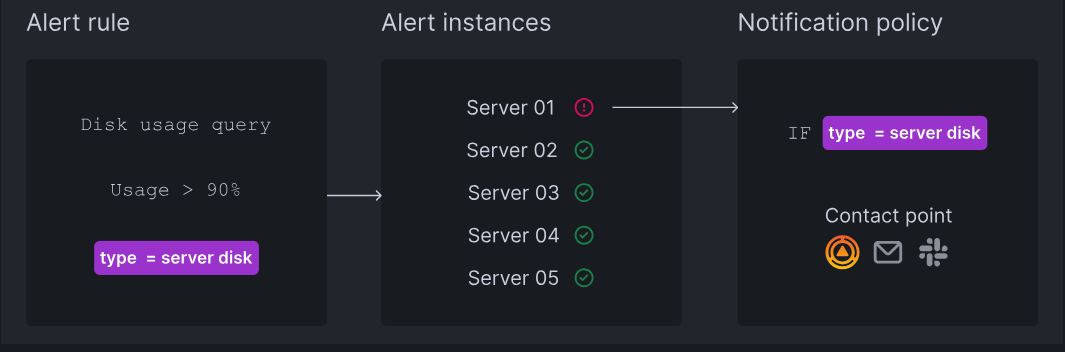
-
Grafana Alerting periodically evaluates alert rules by executing their data source queries and checking their conditions.
-
Each alert rule can produce multiple alert instances - one per time series or dimension.
-
If a condition is breached, an alert instance fires.
-
Firing (and resolved) alert instances are sent for notifications, either directly to a contact point or through notification policies for more flexibility.
Alert states
The alerting system uses three distinct layers of state. Understanding the difference helps when diagnosing why an alert is or isn't notifying.
Alert instance state
Each individual alert instance (one per time series) will be in one of the following states:
| State | Description |
|---|---|
| Normal | The condition is not met. The alert is healthy. |
| Pending | The condition has been met, but not yet for long enough to fire. Prevents notifications for temporary spikes. |
| Firing | The condition has been met for longer than the pending period. Notifications are being sent. |
| No Data | The query returned no data. Behaviour depends on the rule's No Data handling configuration. |
| Error | The rule failed to evaluate (such as, a data source error). Behaviour depends on the rule's Error handling configuration. |
Alert rule state
The overall state of an alert rule is determined by the worst-case state across all of its instances. If any instance is Firing, the rule is considered Firing - even if all other instances are Normal.
Alert rule health
Separate from the alert state, each rule also has a health status:
| Health | Meaning |
|---|---|
| OK | The rule is evaluating successfully. |
| Error | The rule encountered an evaluation error (such as, a data source connectivity issue). |
| NoData | The rule's query returned no data on its last evaluation. |
Rule health is visible in the Alert rules list and is useful for distinguishing a rule that is working correctly but not firing from one that is failing to evaluate at all.
Key concepts
| Component | Description |
|---|---|
| Alert Rules | Consist of queries and expressions to select data, plus a specific condition (threshold) that must be met for the alert to fire. |
| Alert Rule Evaluation | Rules are checked frequently to update the state of alert instances. Notifications are only sent for instances in a "firing" or "resolved" state. |
| Alert Instances | A single rule can produce multiple instances (one per time series or dimension), allowing you to monitor multiple resources with one expression. |
| Contact Points | Define the message content and the destination (such as, Email, Slack, PagerDuty, or Webhooks) for your notifications. |
| Notification Messages | Provide details like status, count, and annotations. These are customizable and can be routed via contact points or notification policies. |
| Notification Policies | Think of notification policies as a routing map for your alerts. They use labels to send the right alerts to the right teams. Every system starts with a Default Policy, which acts as a safety net to make sure no alert is missed. |
| Notification Grouping | Reduces "noise" by bundling related firing alerts into a single notification. This behavior can be customized in the rule or policy settings. |
| Silences & Mute Timings | Pause notifications without stopping the underlying alert evaluation. This ensures your system continues to monitor for issues and display active alerts in the UI, even while notifications are suppressed. |
Learn more
Best practices
For guidance on structuring alert rules, avoiding alert fatigue, and managing large alerting setups, see Best practices for Grafana Alerting.