Knowledge
The Knowledge page lets you build a context library for the OpsPilot AI assistant. By adding information about your technology stack, services, and organisation, you help OpsPilot give more accurate, relevant responses and recommendations.
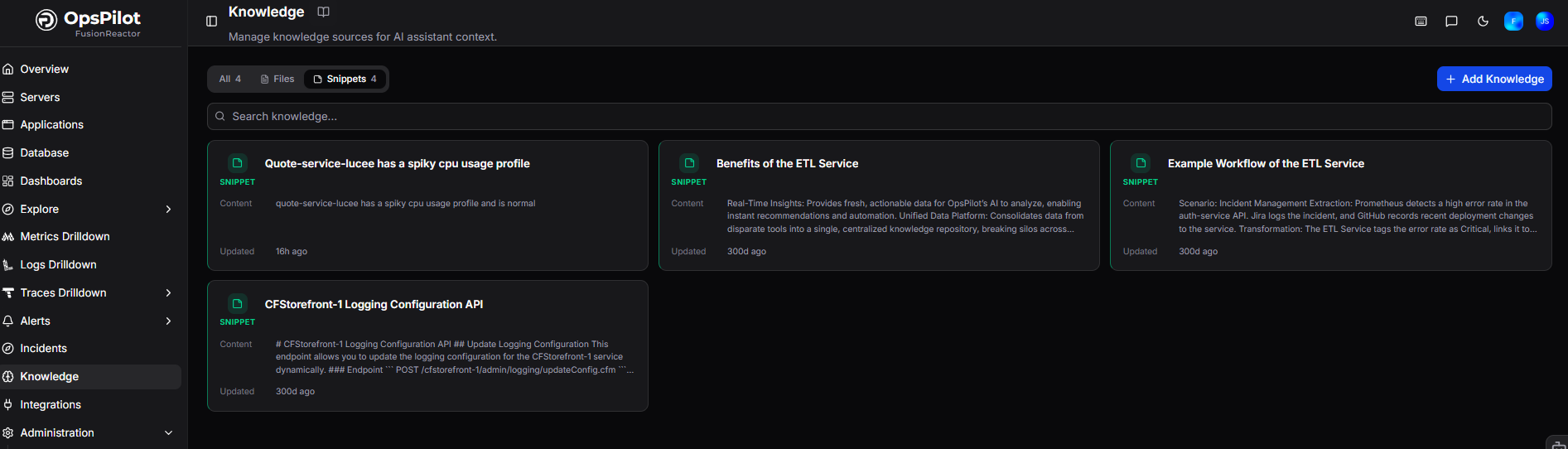
Knowledge is stored as snippets or files, and can be searched, filtered, and tagged to keep your library organised.
Tip
OpsPilot relies heavily on titles and descriptions to find the right knowledge when answering questions. Always review auto-generated titles and edit them if they are incomplete - precise titles lead to better responses.
Adding knowledge
Click + Add Knowledge in the top right and choose the type you want to add.
Snippets
Snippets are short pieces of text you write directly in OpsPilot - ideal for service descriptions, team context, configuration notes, or any information you want the assistant to reference.
- Maximum 5,000 characters per snippet
- Title is optional and will be auto-generated from content if not provided
Tip
Split detailed information across multiple snippets rather than adding it all in one. Smaller, focused snippets improve retrieval accuracy.
Example
Logging configuration instructions, README content, support FAQs, company names and roles, service ownership details.
To add a snippet:
- Click + Add Knowledge and select Snippet.
- Enter a title (optional).
- Add your content in the Content field.
- Add relevant tags to categorise the snippet.
- Click Add Snippet to save.
Files
Files let you upload existing documents directly into the knowledge library - useful for larger reference material that already exists in your organisation.
- Supports:
.txt,.eml,.msg,.xml,.html,.md,.rst,.json,.rtf,.doc,.docx,.ppt,.pptx,.pdf,.odt,.epub,.csv,.tsv,.xlsx,.zip - No size limit on the upload itself, but individual files inside a zip cannot exceed 10 MB
To add a file:
- Click + Add Knowledge and select File.
- Drag and drop your file(s) into the upload area, or click to browse.
- Add tags to categorise the file.
- Click Upload Files to save.
Searching and filtering
Use the search bar to find knowledge by keyword, or use the tabs to filter by type:
| Filter | Description |
|---|---|
| All | Shows all knowledge entries |
| Files | Shows uploaded file entries only |
| Snippets | Shows text snippet entries only |
Tags
Tags help organise your knowledge library and improve how OpsPilot retrieves information.
- Assign tags when adding a snippet or file
- Use tags to group knowledge by service, team, or topic
- Custom tags cannot contain
:characters - these are reserved for system-generated tags that OpsPilot assigns automatically
Need more help?
Contact support in the chat bubble and let us know how we can assist.